Jenkins설치
Dockefile 작성
root@Kindlove:/home/kindlove/temp/Dockerfile# cat Dockerfile-gitlab
FROM jenkins/jenkins:lts

USER root

# npm install, build를 위해 npm 설치
RUN apt-get update && \
    apt-get install -y nodejs npm

USER jenkins

# 플러그인 미리 설치
RUN jenkins-plugin-cli --plugins \
    git \
    gitlab-plugin \
    workflow-aggregator \
    pipeline-stage-view \
    credentials-binding \
    ssh-agent \
    nodejs \
    docker-workflow
Docker build 수행
root@Kindlove:/home/kindlove/temp/Dockerfile# docker build -f ./Dockerfile-gitlab -t jenkins-with-plugins .
[+] Building 1.8s (8/8) FINISHED                                                                                                                                        docker:default
 => [internal] load build definition from Dockerfile-gitlab                                                                                                                       0.0s
 => => transferring dockerfile: 377B                                                                                                                                              0.0s
 => [internal] load metadata for docker.io/jenkins/jenkins:lts                                                                                                                    1.6s
 => [auth] jenkins/jenkins:pull token for registry-1.docker.io                                                                                                                    0.0s
 => [internal] load .dockerignore                                                                                                                                                 0.0s
 => => transferring context: 2B                                                                                                                                                   0.0s
 => [1/3] FROM docker.io/jenkins/jenkins:lts@sha256:1e407df1a9bcb122cc4d71d4ce44d2e3b2be31af004c157453a939f13ae691c7                                                              0.0s
 => CACHED [2/3] RUN apt-get update &&     apt-get install -y nodejs npm                                                                                                          0.0s
 => CACHED [3/3] RUN jenkins-plugin-cli --plugins     git     gitlab-plugin     workflow-aggregator     pipeline-stage-view     credentials-binding     ssh-agent     nodejs      0.0s
 => exporting to image                                                                                                                                                            0.0s
 => => exporting layers                                                                                                                                                           0.0s
 => => writing image sha256:dc223b0781f79b0595fe14f6ab82d52988992f192cc66281df5278562f5b4b6c                                                                                      0.0s
 => => naming to docker.io/library/jenkins-with-plugins
Docker Container run
docker run --detach \
	--name jenkins \
	--publish 8081:8080 \
	--env JENKINS_OPTS="--prefix=/jenkins" \
	jenkins-with-plugins:latest
Jenkins 초기 admin암호 확인
# jenkins docker container의 콘솔 로그를 확인한다.

root@Kindlove:/home/kindlove/temp/Dockerfile# docker logs -f jenkins
Running from: /usr/share/jenkins/jenkins.war
webroot: /var/jenkins_home/war
2026-01-06 06:53:11.281+0000 [id=1]     INFO    winstone.Logger#logInternal: Beginning extraction from war file
2026-01-06 06:53:12.008+0000 [id=1]     INFO    org.eclipse.jetty.server.Server#doStart: jetty-12.0.25; built: 2025-08-11T23:52:37.219Z; git: a862b76d8372e24205765182d9ae1d1d333ce2ea; jvm 21.0.9+10-LTS
2026-01-06 06:53:12.327+0000 [id=1]     INFO    o.e.j.e.w.StandardDescriptorProcessor#visitServlet: NO JSP Support for /jenkins, did not find org.eclipse.jetty.ee9.jsp.JettyJspServlet
2026-01-06 06:53:12.370+0000 [id=1]     INFO    o.e.j.s.DefaultSessionIdManager#doStart: Session workerName=node0
2026-01-06 06:53:12.633+0000 [id=1]     INFO    hudson.WebAppMain#contextInitialized: Jenkins home directory: /var/jenkins_home found at: EnvVars.masterEnvVars.get("JENKINS_HOME")
2026-01-06 06:53:12.736+0000 [id=1]     INFO    o.e.j.s.handler.ContextHandler#doStart: Started oeje9n.ContextHandler$CoreContextHandler@2b5183ec{Jenkins v2.528.3,/jenkins,b=file:///var/jenkins_home/war/,a=AVAILABLE,h=oeje9n.ContextHandler$CoreContextHandler$CoreToNestedHandler@3c782d8e{STARTED}}
2026-01-06 06:53:12.747+0000 [id=1]     INFO    o.e.j.server.AbstractConnector#doStart: Started ServerConnector@7bca6fac{HTTP/1.1, (http/1.1)}{0.0.0.0:8080}
2026-01-06 06:53:12.755+0000 [id=1]     INFO    org.eclipse.jetty.server.Server#doStart: Started oejs.Server@681a8b4e{STARTING}[12.0.25,sto=0] @1957ms
2026-01-06 06:53:12.756+0000 [id=55]    INFO    winstone.Logger#logInternal: Winstone Servlet Engine running: controlPort=disabled
2026-01-06 06:53:12.835+0000 [id=53]    INFO    jenkins.model.Jenkins#<init>: Starting version 2.528.3
2026-01-06 06:53:12.905+0000 [id=63]    INFO    jenkins.InitReactorRunner$1#onAttained: Started initialization
2026-01-06 06:53:14.287+0000 [id=61]    INFO    jenkins.InitReactorRunner$1#onAttained: Listed all plugins
2026-01-06 06:53:15.782+0000 [id=82]    INFO    jenkins.InitReactorRunner$1#onAttained: Prepared all plugins
2026-01-06 06:53:15.791+0000 [id=88]    INFO    jenkins.InitReactorRunner$1#onAttained: Started all plugins
2026-01-06 06:53:15.792+0000 [id=79]    INFO    jenkins.InitReactorRunner$1#onAttained: Augmented all extensions
2026-01-06 06:53:16.226+0000 [id=79]    INFO    jenkins.InitReactorRunner$1#onAttained: System config loaded
2026-01-06 06:53:16.226+0000 [id=73]    INFO    jenkins.InitReactorRunner$1#onAttained: System config adapted
2026-01-06 06:53:16.227+0000 [id=73]    INFO    jenkins.InitReactorRunner$1#onAttained: Loaded all jobs
2026-01-06 06:53:16.234+0000 [id=73]    INFO    jenkins.InitReactorRunner$1#onAttained: Configuration for all jobs updated
2026-01-06 06:53:16.250+0000 [id=106]   INFO    hudson.util.Retrier#start: Attempt #1 to do the action check updates server
2026-01-06 06:53:16.450+0000 [id=87]    INFO    jenkins.install.SetupWizard#init:
[LF]>
[LF]> *************************************************************
[LF]> *************************************************************
[LF]> *************************************************************
[LF]>
[LF]> Jenkins initial setup is required. An admin user has been created and a password generated.
[LF]> Please use the following password to proceed to installation:
[LF]>
[LF]> aa05906b42934b5dbc1552527e2a7258
[LF]>
[LF]> This may also be found at: /var/jenkins_home/secrets/initialAdminPassword
[LF]>
[LF]> *************************************************************
[LF]> *************************************************************
[LF]> *************************************************************

2026-01-06 06:53:19.699+0000 [id=87]    INFO    jenkins.InitReactorRunner$1#onAttained: Completed initialization
2026-01-06 06:53:19.723+0000 [id=53]    INFO    hudson.lifecycle.Lifecycle#onReady: Jenkins is fully up and running
2026-01-06 06:53:22.365+0000 [id=106]   INFO    h.m.DownloadService$Downloadable#load: Obtained the updated data file for hudson.tasks.Maven.MavenInstaller
2026-01-06 06:53:23.590+0000 [id=106]   WARNING h.m.DownloadService$Downloadable#updateNow: No tool installer metadata found for jenkins.plugins.nodejs.tools.MirrorNodeJSInstaller
2026-01-06 06:53:25.222+0000 [id=106]   INFO    h.m.DownloadService$Downloadable#load: Obtained the updated data file for hudson.plugins.nodejs.tools.NodeJSInstaller
2026-01-06 06:53:25.222+0000 [id=106]   INFO    hudson.util.Retrier#start: Performed the action check updates server successfully at the attempt #1
나머지 포탈 설정완료
- http://localhost:8081/jenkins 진입한다.
- 진입 후 아래에서 Install suggested plugins를 선택한다.

앞서 미리 다운로드한 플러그인들을 설치한다.
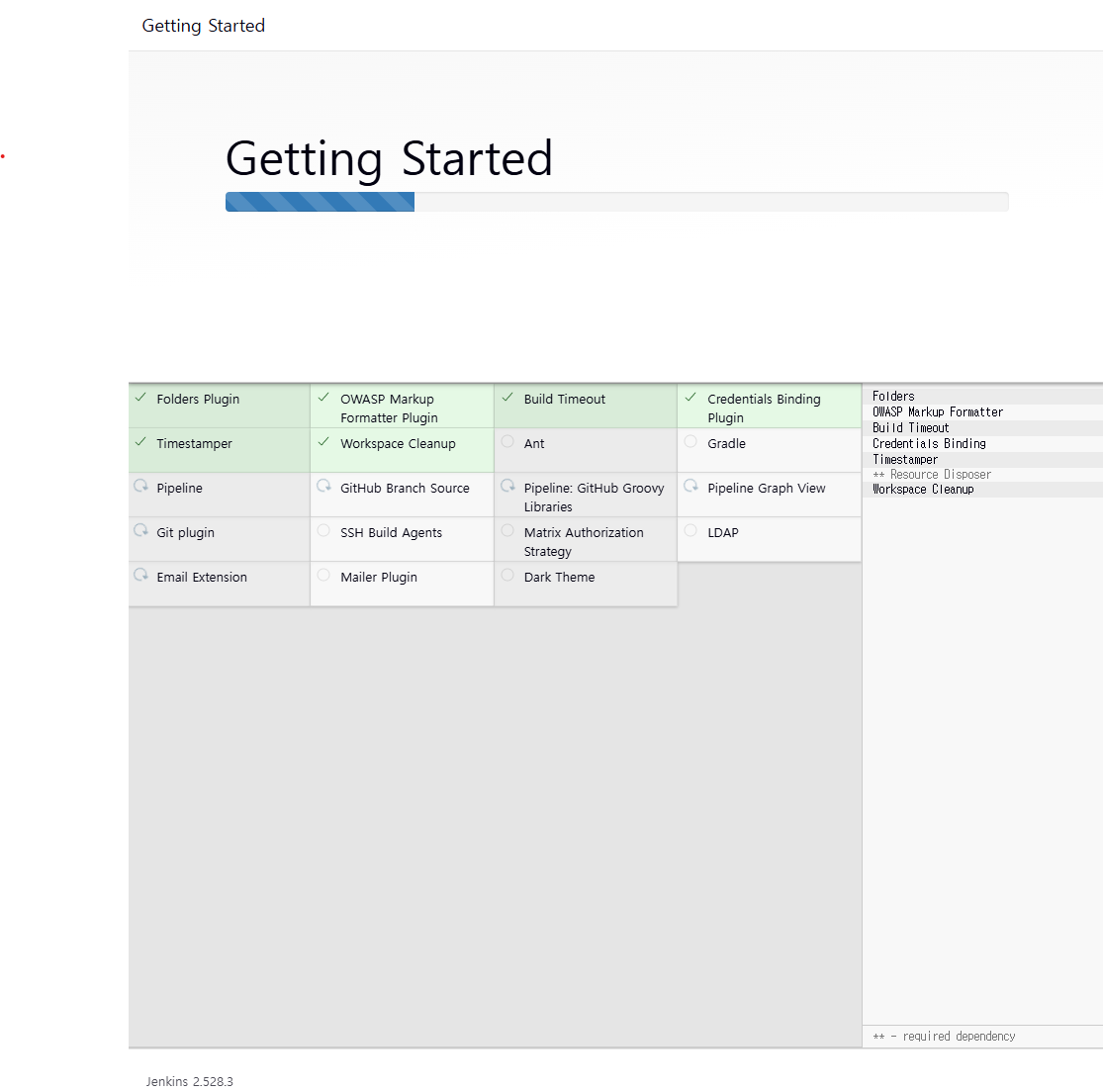
나머지 설정을 완료한다.
Gitlab 설치
# Docker Hub에서 gitlab-ce:latest 이미지를 다운로드 받는다.

root@Kindlove:/home/kindlove/temp/Dockerfile# docker pull gitlab/gitlab-ce:latest
latest: Pulling from gitlab/gitlab-ce
20043066d3d5: Pull complete
2a269e0d914a: Pull complete
5e78dba6c458: Pull complete
dc48e1acb6a5: Pull complete
f83d05f8bca9: Pull complete
c94ef1d2b6ab: Pull complete
3d67ddcc7a9f: Pull complete
d95557cd3487: Pull complete
afcaae56f7bc: Pull complete
Digest: sha256:9c17686c3cd1b72f52282543d2dcf7c96add29b4698ec367bfb1455be8f13ce0
Status: Downloaded newer image for gitlab/gitlab-ce:latest
docker.io/gitlab/gitlab-ce:latest
Gitlab Conainer 수행
root@Kindlove:/home/kindlove/temp/Dockerfile# sudo mkdir /home/kindlove/gitlab
root@Kindlove:/home/kindlove# export GITLAB_HOME=/home/kindlove/gitlab
root@Kindlove:/home/kindlove/temp/Dockerfile# docker run --detach \
    --hostname localhost \
	--publish 8082:80 --publish 1922:22 --publish 19443:443 \
	--env GITLAB_OMNIBUS_CONFIG="external_url 'http://localhost/gitlab'; gitlab_rails['gitlab_relative_url_root'] = '/gitlab'" \
	--name gitlab \
	--restart always \
	--volume $GITLAB_HOME/config:/etc/gitlab \
	--volume $GITLAB_HOME/logs:/var/log/gitlab \
	--volume $GITLAB_HOME/data:/var/opt/gitlab \
	--shm-size 256m \
	gitlab/gitlab-ce:latest
c910817ea46e9ec97b71199e875cbc50c1f01c8b22f79d481a6c92902f20aef9
위에서 external_url 에 http://localhost:8082/gitlab 처럼 포트를 동일하게 드러내면 gitlab컨테이너 수행시 nginx 에서 8082포트를 열려다 already in use 에러를 맞게 된다. 이는 gitlab 구조상 제약으로 웹에 표출된 gitlab clone 주소는 localhost/gitlab으로 표기됨을 감안하고 진행한다.
Gitlab 초기 root 패스워드 확인
root@Kindlove:/home/kindlove# docker exec -it gitlab /bin/bash
root@localhost:/# cat /etc/gitlab/initial_root_password
# WARNING: This password is only valid if ALL of the following are true:
#          • You set it manually via the GITLAB_ROOT_PASSWORD environment variable
#            OR the gitlab_rails['initial_root_password'] setting in /etc/gitlab/gitlab.rb
#          • You set it BEFORE the initial database setup (typically during first installation)
#          • You have NOT changed the password since then (via web UI or command line)
#
#          If this password doesn't work, reset the admin password using:
#          https://docs.gitlab.com/security/reset_user_password/#reset-the-root-password

Password: y6XZnqIXgcJfvUvKcSD/aRNU0xxij3nq+Xz74IKfAlA=

# NOTE: This file is automatically deleted after 24 hours on the next reconfigure run.
http://localhost:8082/gitlab으로 접속하여 계정으로 로그인하면 아래 초기 화면을 볼 수 있다.

'Devops > Docker' 카테고리의 다른 글
| [Docker] ssh 가능한 Ubuntu 컨테이너 만들기 (0) | 2026.01.06 |
|---|---|
| [Docker] Docker Oracle 이미지 백업, 복원 (1) | 2024.12.04 |
| [Docker] Docker로 Postgresql 설치하기 (0) | 2024.05.25 |
| [Docker] 도커로 몽고db 설치하기 (1) | 2024.03.23 |
| [Docker] Harbor 로컬 컨테이너 저장소 Push 하기 (0) | 2024.03.16 |

